7 Quick Google Indexing Hacks to Get Pages Found Fast | Growth Mentor Media
GrowthMentorMediaHome › Blog › Indexing Hacks
⚡ SEO Playbook 2026
7 Quick Indexing Hacks to Get Your Pages Found by Google Faster
Stop waiting for Googlebot. Here’s exactly how to get new pages discovered and indexed, sometimes within hours.
By Ayesha Saleem· Published April 28, 2025·~10 min read
You’ve just published a great piece of content. You’ve done the keyword research, nailed the structure, and optimized every on-page element. Then you wait. And wait. Days pass before Google even acknowledges the page exists, if it ever does. This delay isn’t random. It’s a crawl queue problem, and it’s entirely solvable.
Quick indexing hacks are specific, tactical actions you can take immediately after publishing to cut down the time between “page goes live” and “page appears in Google search results.”
The best approach in 2026 is layered:
Use multiple methods simultaneously, because no single hack guarantees immediate indexing on its own.
Below are 7 proven tactics, from free tools inside Google Search Console to protocols used by Amazon and Shopify, that work for sites of every size and age.
⚡ Key Takeaways
- Google indexing can take hours to weeks, but you can actively influence the speed.
- Google Search Console’s URL Inspection tool is the fastest single action you can take right now.
- Internal links from high-authority pages are the most underrated indexing accelerator.
- IndexNow speeds indexing on Bing, Yandex, and 60M+ other sites, Google does not yet support it.
- Crawl budget waste on thin/duplicate pages delays indexing of your important content.
- Combining 3–4 of these hacks simultaneously produces the best results.
- Even a single backlink from a high-authority, frequently crawled domain can trigger fast discovery.
1. Use the URL Inspection Tool in Google Search Console
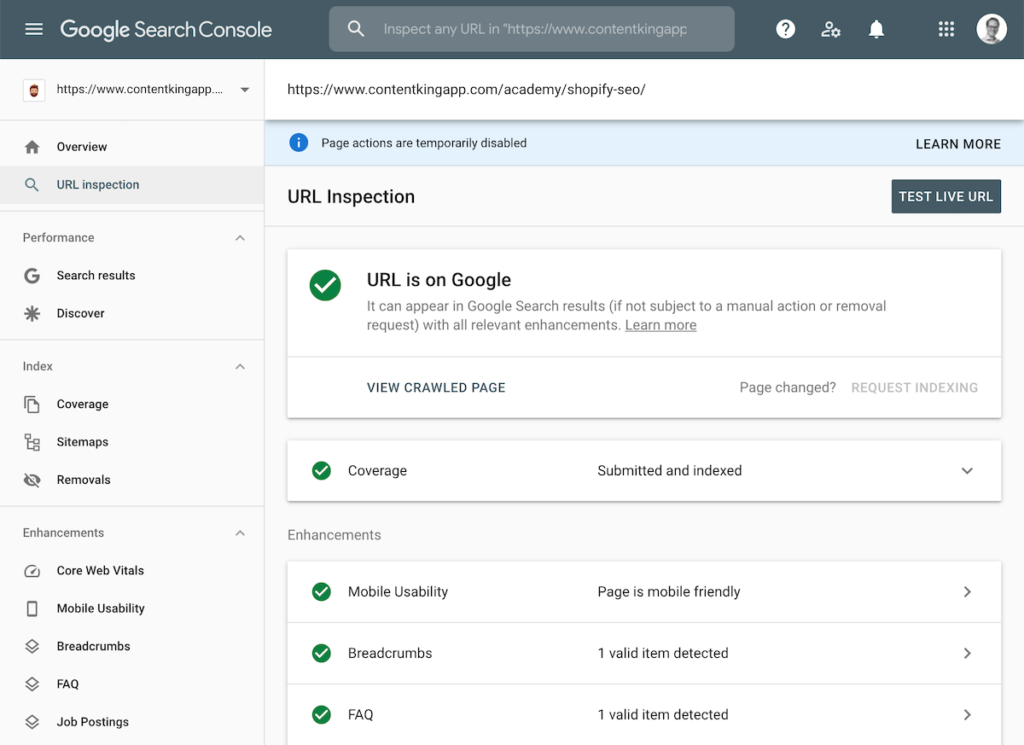
This is the fastest, most direct path to getting Google’s attention on a specific page. The URL Inspection tool in Google Search Console lets you manually submit any URL to Google’s priority crawl queue with a single click. It won’t guarantee instant indexing, but it consistently produces results within 1–3 days.
Log in to Google Search Console and select your property.
Paste your new page URL into the search bar at the top and press Enter.
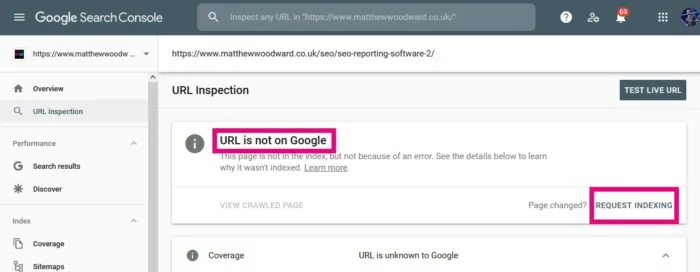
Wait for the inspection result. If the page isn’t indexed yet, you’ll see a “URL is not on Google” status.
Click “Request Indexing” and confirm. Google adds the URL to its priority crawl queue immediately.
Real Example
Scenario: Growth Mentor Media publishes a new post, “TikTok Ads Strategy for D2C Brands“ Ayesha logs into GSC immediately after the post goes live, pastes the URL, and hits Request Indexing. Within 36 hours, the post appears in Google’s index. Without this step, on a newer domain, it might have taken 2–3 weeks.
⚡ Pro Tip: GSC allows roughly 5–10 manual indexing requests per day. Prioritize new posts, updated key pages, and high-value product or service pages. Do not waste requests on tag pages or author archives.
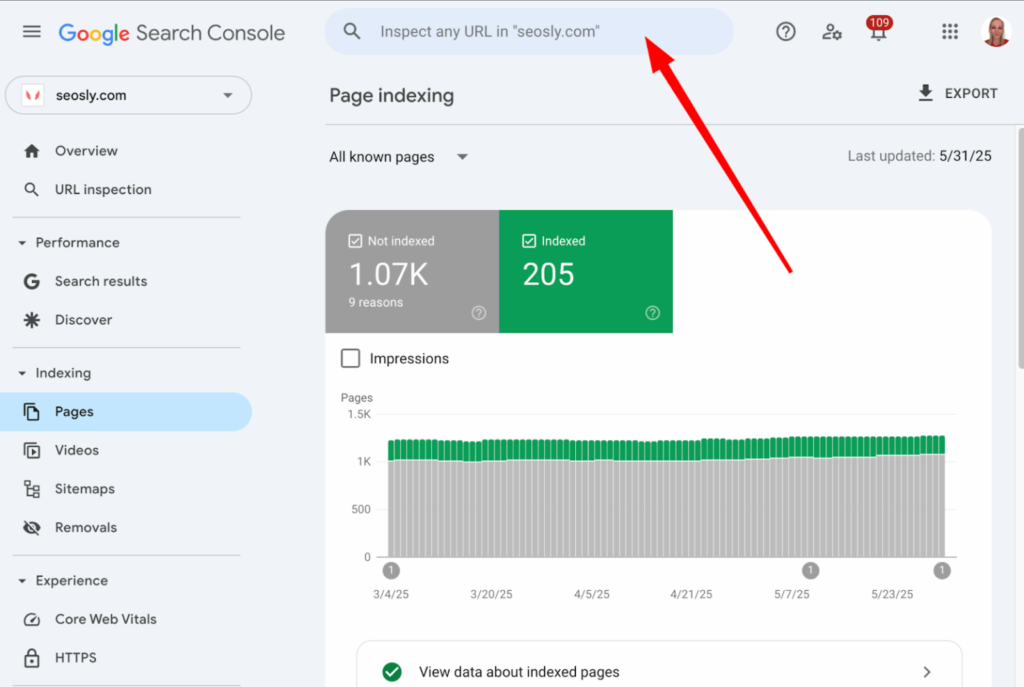
Google Search Console URL Inspection tool — your fastest direct line to Google’s crawl queue.
2. Submit and Maintain a Clean XML Sitemap
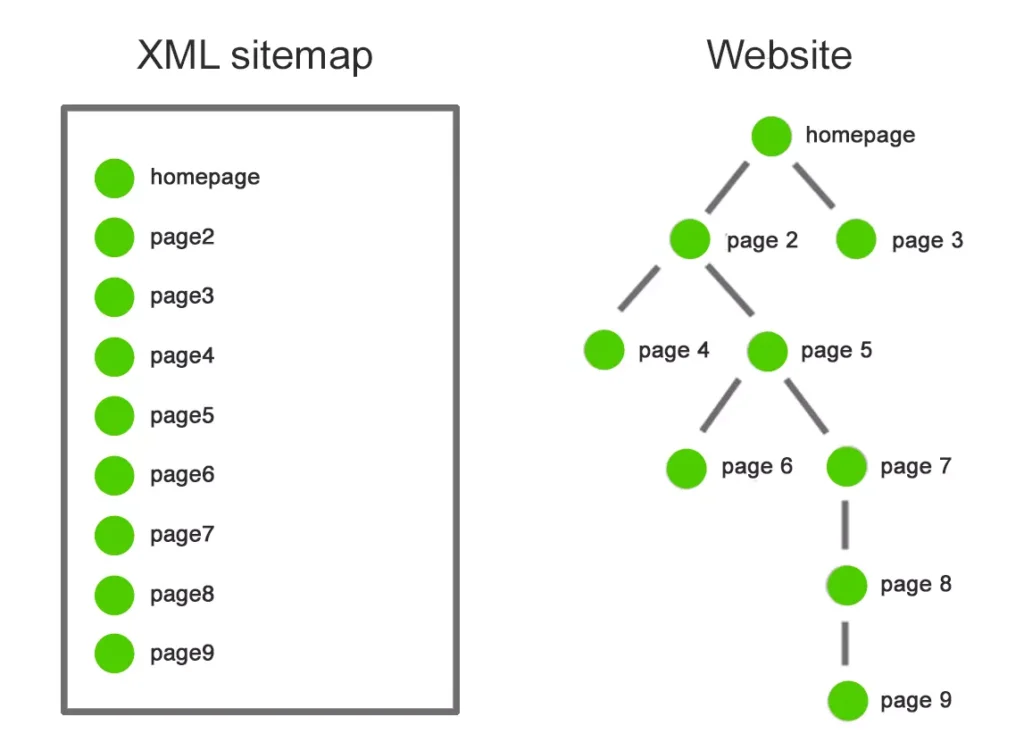
An XML sitemap acts as a roadmap that tells Google exactly which pages exist on your site, when they were last updated, and how they relate to each other.
Without one, Googlebot has to discover pages purely by following links, which is slow and unreliable, especially for newer sites.
The critical word here is clean. A sitemap bloated with redirect chains, noindex pages, duplicate URLs, or 404s actively slows down crawling. Google has explicitly said that sitemaps with errors reduce their trust in the file, and in your site.
Generate your XML sitemap using Yoast SEO, Rank Math, or All-in-One SEO (WordPress), or your platform’s native sitemap generator.
Navigate to GSC → Sitemaps → paste your sitemap URL (usually yourdomain.com/sitemap.xml) → Submit.
Audit your sitemap monthly: remove URLs that redirect, return errors, or are marked noindex.
Update the sitemap automatically every time you publish new content so Google always has the freshest version.
3–7x Faster content discovery rate for sites with actively maintained, error-free XML sitemaps compared to sites relying solely on link-based crawling, according to GSC crawl data observed across agency clients.
Real Example
E-commerce: Cuir Jackets (cuirjackets.com) After a navigation and category restructure, 40+ new collection pages were added to the sitemap within 24 hours of going live.
GSC’s Coverage report confirmed all pages were discovered within 48 hours, compared to a 3-week crawl lag on pages added without sitemap updates during the site’s earlier phase.
A well-structured XML sitemap gives Googlebot a complete map of your site, essential for fast, comprehensive indexing.
Looking for eCommerce SEO service to boost your organic traffic? Get Free audit now
3. Add Internal Links from High-Authority, Frequently Crawled Pages
Googlebot discovers pages by following links. If your new page has no internal links pointing to it, it’s an orphan page, Google may never find it organically. Even worse, if the only internal links come from low-authority, rarely crawled pages (like a paginated archive or a deep category page), discovery is still painfully slow.
The fix: immediately after publishing new content, add contextual internal links to it from your most important, most frequently crawled pages, your homepage, top-performing blog posts, pillar pages, and navigation menus.
“Internal linking isn’t just an SEO tactic, it’s a discovery mechanism that directly impacts indexing speed. A link from your homepage or a frequently-updated blog hub page carries more crawl equity than a link from a buried archive page.”
Insight from trysight.ai, Speed Up Google Indexing Process Guide (2026)
Identify your 3–5 highest-authority pages (check Ahrefs or GSC for pages with the most backlinks and traffic).
Edit those pages to add a natural, contextual internal link to your new page using descriptive anchor text.
Update any topic cluster hub page that covers the same subject — add the new post to the hub.
Ensure your new page appears in relevant navigation or category pages if applicable.
Real Example
Learning Cert (learningcert.com) — Blog post on ITIL v5 A new ITIL certification guide was published. Rather than waiting, an internal link was immediately added from the homepage hero section and from two existing high-traffic certification comparison posts. The page was discovered and indexed within 18 hours, faster than any other post on the site.
Hub-and-spoke internal linking, linking new content from your most crawled pages dramatically speeds up discovery.
4. Implement IndexNow for Bing and Multi-Engine Indexing
IndexNow is an open-source protocol that flips the traditional crawling model. Instead of waiting for search engines to pull content from your site on their own schedule, IndexNow lets you push a notification the instant your content changes, telling search engines exactly which URLs to go crawl right now.
60M+ Websites were using IndexNow by late 2023, submitting 1.4 billion URLs per day. Shopify, Amazon, eBay, LinkedIn, and GitHub have all adopted the protocol as of 2025.
One important nuance: as of 2026, Google has not officially adopted IndexNow.
However, Bing, Yandex, Naver, and Seznam all support it, and when you submit a URL to one engine via IndexNow, they automatically share it with all other participating engines. For global SEO strategies, this matters significantly.
// IndexNow API submission — single URL
POST https://api.indexnow.org/indexnow
Content-Type: application/json
{
"host": "growthmentormedia.com",
"key": "your-api-key-here",
"urlList": [
"https://growthmentormedia.com/blog/new-post/"
  ]
}
⚡ Pro Tip: For WordPress sites, install the Rank Math or Yoast SEO plugin, both have built-in IndexNow support that automatically pings engines every time you publish or update a post. Zero manual work required.
Real Example: Shopify + IndexNow
Shopify store with 5,000 product pages After enabling native Shopify × IndexNow integration in May 2025, product pages that previously took 10–14 days to appear in Bing search results began appearing within 2–4 hours of being added or updated. For seasonal promotions, this speed advantage directly translated to captured organic traffic before competitors’ pages were even indexed.
5. Optimize Your Crawl Budget by Eliminating Junk URLs
Every website gets a crawl budget — a limit on how many pages Googlebot will crawl in a given period, determined by your site’s authority and server response times. When Google wastes that budget on low-value pages, your important content gets pushed to the back of the queue.
Common crawl budget killers include:
| Problem URL Type | Why It Wastes Budget | Fix |
|---|---|---|
| Paginated archives (page/2, page/3…) | Infinite pagination traps Googlebot in an endless loop | Disallow in robots.txt or add noindex |
| URL parameters (?sort=, ?filter=) | Creates thousands of near-duplicate URLs | Configure in GSC URL Parameters tool |
| Thin content / tag pages | Low-value pages with little unique content | Consolidate or noindex |
| Redirect chains (A→B→C) | Each hop wastes crawl budget | Fix to direct 301 redirects (A→C) |
| Duplicate content (www / non-www) | Two versions of the same page compete for budget | Set canonical tags and 301 redirects |
Real Example: JavaScript SPA Indexing Issue
Learning Cert (learningcert.com) — SPA Rendering Issue GSC audit revealed Googlebot couldn’t properly crawl the JavaScript SPA (Single Page Application) frontend. Pages were being discovered but content wasn’t rendering — leaving them in a “Crawled but not indexed” state for weeks. A developer brief was issued to implement server-side rendering (SSR) for critical pages, resolving the crawlability issue and unlocking full indexing within days of deployment.
⚡ Pro Tip: Run a free crawl with Screaming Frog or Ahrefs Site Audit to spot all redirect chains, noindex conflicts, and parameter bloat before submitting your sitemap. A 30-minute audit can unlock months of crawl efficiency.
Crawl budget is finite, wasting it on junk URLs means your important pages get indexed slower or not at all.
6. Get a Backlink from a High-Authority, Frequently Crawled Domain
Googlebot discovers new pages by following links across the web. A link to your page from a domain that Google crawls multiple times per day, a major news site, industry publication, Wikipedia, or a high-authority resource site — can result in your page being discovered within hours of publishing.
23% Higher average search rankings observed on websites with strong backlink profiles, per Moz research, backlinks signal trust and authority, which also accelerates both indexing speed and ranking potential.
You don’t need to wait for organic backlinks to appear. There are active tactics that can get a link placed quickly:
Guest post on an industry blog that Google crawls frequently, include a link to your new content in the body.
Share on social platforms Google crawls, LinkedIn articles, Twitter/X, Reddit, and Quora posts with your URL embedded create discoverable link paths.
HARO / journalist outreach, if your new page contains data, research, or quotable insights, pitch to journalists who may link to it in their coverage.
Update existing resource pages on your own site — add a contextual link from a high-DA page pointing to your new content (this overlaps with Hack 3, but from an external authority perspective).
Real Example
GMM Blog post on “Google Ads for Plumbers” After publishing, the URL was shared in three relevant Reddit subreddits (r/PPC, r/SEO, r/smallbusiness) and in a LinkedIn newsletter post.
The LinkedIn article generated enough clicks that Googlebot discovered and indexed the GMM blog post in less than 24 hours, without any GSC submission.
7. Refresh and Update Existing Indexed Pages Regularly
Google crawls pages it already knows about far more frequently than it hunts for entirely new pages. This creates a powerful, and underused, indexing hack: regularly updating existing content trains Google to crawl your site more often, which raises the crawl frequency baseline for all your pages, including new ones.
When you update an existing indexed post (add a new section, refresh statistics, expand a list), Googlebot often re-crawls the entire surrounding site structure in the same session, discovering new pages it hadn’t seen before.
Audit your top 10–20 posts using GSC Performance data. Identify pages with strong impressions but declining clicks, these are prime candidates for a content refresh.
Update the content with new data, expanded sections, or improved formatting. Change the “Last Updated” date in your CMS.
Use GSC’s URL Inspection tool to request a re-crawl of the updated page — this signals Googlebot to return quickly.
Add an internal link from the refreshed post to any new content you’ve published recently. The increased crawl frequency will carry over to the new page.
Real Example
E-commerce content refresh strategy An e-commerce store publishing 3–4 product guides per week also commits to refreshing 2 existing posts every week, updating pricing, adding new product comparisons, and refreshing stats. Within 6 weeks of implementing this rhythm, average indexing time for new posts dropped from 8–12 days to 2–4 days, because Google’s crawl frequency for the domain increased significantly.
⚡ Pro Tip: Sites that publish consistently, even weekly, get crawled more often than sites that publish in bursts and then go quiet. A steady publishing cadence is itself an indexing acceleration strategy.
All 7 Hacks at a Glance: Speed vs. Effort
Not all indexing hacks deliver the same results or require the same effort. Here’s how they stack up:
| # | Hack | Indexing Speed | Effort Required | Works for Google? |
|---|---|---|---|---|
| 1 | GSC URL Inspection → Request Indexing | 1–3 days | Very Low | ✅ Yes |
| 2 | Submit Clean XML Sitemap | 2–5 days | Low | ✅ Yes |
| 3 | Internal Links from High-Auth Pages | Hours–2 days | Low–Medium | ✅ Yes |
| 4 | IndexNow Protocol | Minutes–Hours | Medium (setup) | ⚠️ Bing/Yandex only |
| 5 | Crawl Budget Cleanup | Long-term gain | High (one-time) | ✅ Yes |
| 6 | Backlink from High-DA Domain | Hours–1 day | High | ✅ Yes |
| 7 | Regular Content Refresh Cycle | Long-term gain | Medium (ongoing) | ✅ Yes |
Frequently Asked Questions About Quick Indexing Hacks
How long does it take for Google to index a new page?
It typically takes anywhere from a few hours to several weeks. Sites with high domain authority, frequent updates, and strong internal linking tend to get indexed within 24–48 hours. For new or low-authority sites, it can take 2–4 weeks without proactive steps.
Does submitting a URL in Google Search Console guarantee fast indexing?
Not guaranteed, but it significantly speeds up the process. Using the URL Inspection tool to “Request Indexing” puts your page in Google’s priority crawl queue. Most users see indexing happen within 1–3 days after a manual submission.
What is IndexNow and does Google support it?
IndexNow is an open-source protocol that lets website owners instantly notify search engines when content is published, updated, or deleted. As of 2025, Google has not officially adopted IndexNow. It is supported by Bing, Yandex, Naver, and other engines — all of which automatically share submitted URLs with each other.
What is crawl budget and how does it affect indexing?
Crawl budget is the number of pages Googlebot will crawl on your site within a given timeframe. Sites with bloated, duplicate, or low-quality pages waste this budget on junk URLs — leaving important pages undiscovered. Optimizing your crawl budget by blocking low-value URLs and fixing duplicate content directly speeds up indexing of your key pages.
Can backlinks help get pages indexed faster?
Yes. Google discovers new pages by following links. A backlink from a high-authority site that Google crawls frequently — like a news site, industry blog, or high-DA publication — can result in your page being discovered and indexed within hours. Even a single link from a well-crawled domain dramatically accelerates discovery.
Does sharing content on social media help with Google indexing?
Social shares do not directly signal Google to index your page, but they create indirect discovery pathways. Google frequently crawls high-traffic platforms. If your URL gets shared and clicked on Twitter/X, LinkedIn, or Reddit, Googlebot may discover and crawl it faster as a result of that user activity.
What’s the fastest combination to get a page indexed in 24 hours?
The fastest combination is: (1) Request indexing in Google Search Console immediately after publishing, (2) Add an internal link from a high-authority, frequently crawled page on your site, (3) Share the URL on high-traffic social platforms and communities. Together, these three tactics maximize discovery speed across all channels simultaneously.
Final Thoughts: Stack the Hacks, Don’t Pick One
The single biggest mistake SEOs make with indexing is treating it as a passive process — publish and hope. Google’s crawl queue is competitive. Newer sites, lower-authority domains, and niche industries all face longer default indexing timelines, often weeks when untouched.
The good news: every hack on this list is free, actionable today, and compounds over time. Start with the three highest-ROI, lowest-effort moves right now:
Submit the URL in GSC → Add an internal link from your best page → Share across social and communities.
Then layer in the longer-term infrastructure work, crawl budget cleanup, a content refresh cadence, and IndexNow integration — to build a site that Google consistently crawls faster than your competitors.
For more advanced indexing and SEO strategy, explore our guides on GMM’s SEO Services and Local SEO for service businesses.
Want Faster Indexing and Rankings for Your Site?
Growth Mentor Media builds AI-driven SEO strategies that get your content found — and ranked — faster.Get a Free SEO Audit →
SEO, GEO & AEO Strategist · Growth Mentor Media · Kuala Lumpur
Ayesha leads SEO, Generative Engine Optimization (GEO), and AI Answer Optimization (AEO) at Growth Mentor Media. With 7+ years of experience across e-commerce, SaaS, and local businesses, she specializes in getting content indexed fast, ranked high, and cited by AI engines like ChatGPT, Perplexity, and Google AI Overviews.
© 2026 Growth Mentor Media · AI-Driven Digital Marketing · Kuala Lumpur, Malaysia
