Performance Max Campaign Setup: The Complete Step-by-Step Guide for 2026

By Sarib Khan Kakerzai | Paid Media Strategist, Growth Mentor Media | April 29, 2026
| Key Takeaways: 1. Performance Max now drives 45% of all Google Ads conversions in 2026, it is not optional for serious advertisers. 2. Conversion tracking accuracy is the single most critical input. Get this wrong and the algorithm optimizes for the wrong thing from day one. 3. Do not set a Target ROAS or CPA during the first 2 to 4 weeks. Let the campaign collect 30 to 50 conversions first, then apply efficiency targets. 4. Asset groups are not ad groups. Create one per product category or service line with distinct creative per group. 5. Add brand exclusions on day one. Otherwise PMax will serve on your own branded queries, inflate your ROAS numbers, and make everything look better than it is. 6. Audience signals are suggestions, not restrictions. The algorithm will expand beyond them. Your job is to give it the best starting data, your customer list, website visitors, video viewers. |
Why Performance Max Is the Campaign Type You Cannot Ignore in 2026
Let me be straight with you. Performance Max is not something you can keep deferring. By early 2026, PMax now accounts for 45% of all Google Ads conversions.
If you are still running only Search and Shopping separately while your competitors run consolidated PMax campaigns with clean signals and strong creatives, you are losing ground every day.
That said, PMax is also the most misunderstood campaign type in the Google Ads ecosystem. Most advertisers either treat it as a set-and-forget black box or avoid it entirely because it feels uncontrollable. Both approaches waste money.
This guide is for people who want to actually understand how to set it up properly. Every step. Every setting. What to do and why. Let us get into it.
What Performance Max Actually Is (And What It Is Not)
Performance Max is Google’s AI-driven campaign type that serves your ads across every Google-owned channel from a single campaign setup: Search, Shopping, YouTube, Display, Gmail, Discover, and Maps.
You provide the inputs, conversion goals, creatives, audience signals, and Google’s machine learning handles placement, bidding, and audience selection in real time.
The key thing to understand is that PMax does not replace your Search campaigns. It complements them. Keep your branded keywords and high-intent search terms in dedicated Search campaigns. PMax handles broader discovery and cross-channel reach on top of that.
Looking for eCommerce SEO service to boost your organic traffic? Get Free audit now

| What PMax Is | What PMax Is Not |
| A cross-channel AI campaign that finds buyers across all Google properties | A replacement for Search — keep branded and high-intent keywords in Search |
| A system that responds to the inputs you provide (assets, signals, tracking) | A set-and-forget tool — it needs human guidance and regular creative refreshes |
| The most powerful reach tool in Google Ads for scaled conversion volume | A transparent campaign — reporting is still limited vs. keyword-level Search data |
| Best used after conversion tracking is verified and working accurately | Suitable for accounts with zero conversion history or unreliable tracking |
Before You Even Open Google Ads: Prerequisites
Most campaigns fail before they launch because the foundation is wrong. Do these three things before you touch the campaign builder.
1. Verify Your Conversion Tracking
Performance Max is entirely conversion-driven. If your tracking is broken, incomplete, or counting the wrong things, you are giving the algorithm garbage data and asking it to optimize for garbage outcomes. No amount of creative or budget will fix bad tracking.
Before you set up PMax, go to Goals in Google Ads, then Conversions, then Summary. Check every active conversion action and ask yourself: is this a real business outcome?
Things like page views, scroll depth, or session starts should be set to secondary or removed as conversion goals. Your primary conversions should be purchases, lead form submissions, or phone calls over 60 seconds, actions that directly tie to revenue.
Also make sure Enhanced Conversions are turned on. This sends hashed first-party data back to Google and significantly improves attribution accuracy as third-party cookies continue to phase out.
2. Link Google Analytics 4 to Google Ads
If GA4 is not linked to your Google Ads account, link it now. This gives the algorithm access to on-site behavioral signals beyond just conversion events, which helps PMax understand what kind of user activity leads to your best customers. It also allows for audience list importing for your audience signals later.
3. Prepare Your Creative Assets Before You Build
Do not open the campaign builder and start assembling assets from scratch. Have everything ready in a folder first. PMax rewards creative variety. The more genuinely different assets you provide, the faster the algorithm finds which combinations work.
| Asset Type | Minimum Required | Recommended in 2026 |
| Headlines (short, 30 chars) | 3 | 8 to 10 variations |
| Long Headlines (90 chars) | 1 | 4 to 5 variations |
| Descriptions (90 chars) | 2 | 5 to 6 variations |
| Landscape Images (1.91:1) | 1 | 5 to 10 high-quality |
| Square Images (1:1) | 1 | 5 to 10 high-quality |
| Portrait Images (4:5) | Optional | 3 to 5 for mobile |
| Logo (square 1:1) | 1 | 2 to 3 variations |
| Videos (YouTube) | Optional | 1 to 3 (strongly recommended) |
| One thing people keep getting wrong: uploading only the minimum assets. Google needs variety to find the best combinations for different placements and users. Six versions of the same product photo on a white background is not variety. Give it lifestyle shots, detail close-ups, benefit-led images, and at least one video. Campaigns with complete video libraries perform 25 to 40 percent better than image-only campaigns. |
The Complete 8-Step Performance Max Campaign Setup
| STEP 1 | Create a New Campaign and Choose Your Objective |
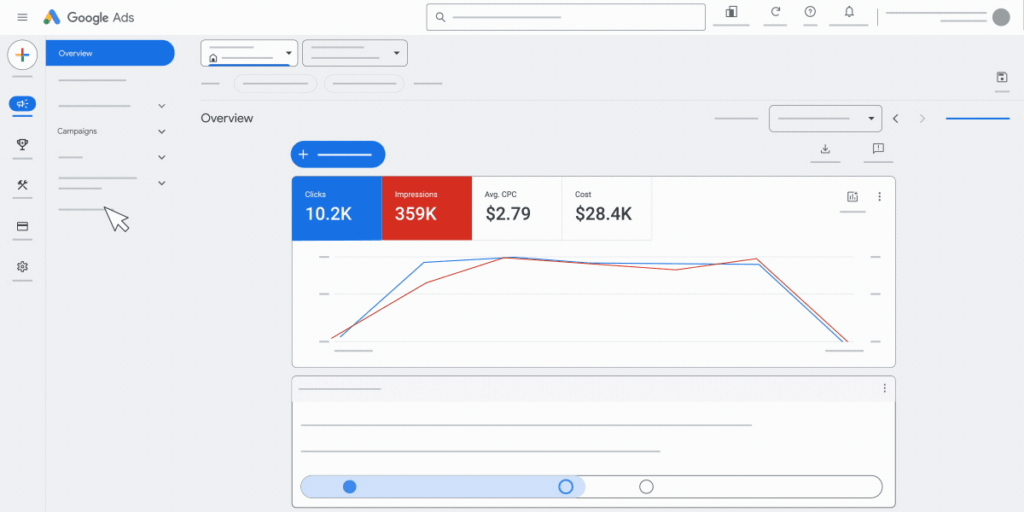
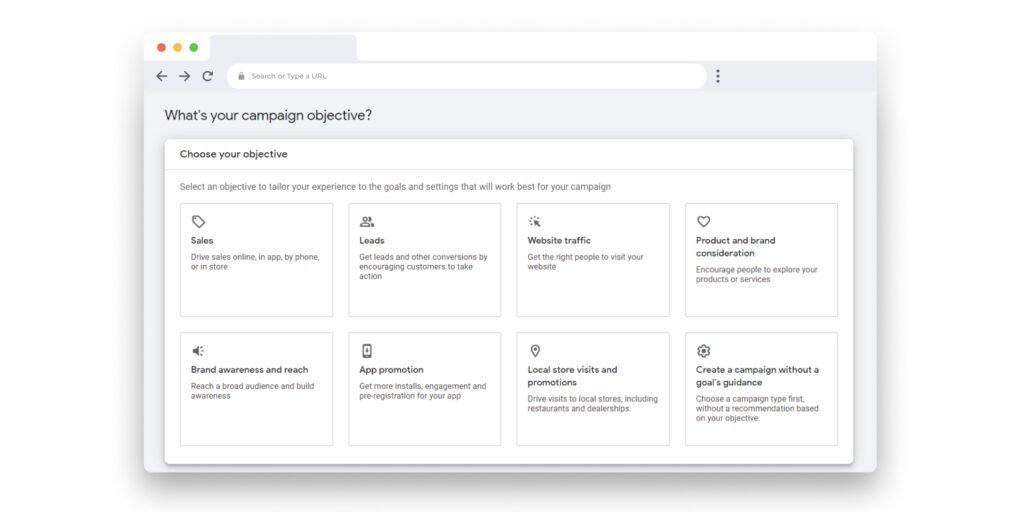
Log in to Google Ads. Click the blue plus button to create a new campaign. You will be asked to choose a campaign objective.
Select one of these three: Sales (recommended for ecommerce), Leads (for service businesses and lead gen), or Website traffic (for newer accounts with limited conversion history).
Important: choose only one objective. If you need both leads and sales, build two separate campaigns. Mixing objectives inside one PMax campaign creates conflicting optimization signals and the algorithm will not know what to prioritize.
After selecting your objective, select Performance Max as the campaign type. Name your campaign something specific and descriptive. You will likely have multiple PMax campaigns over time, so naming matters.
Something like PMax | Women Shoes | US | April 2026 is far more useful than Performance Max Campaign 1.
| STEP 2 | Set Up Your Bidding Strategy |
Performance Max only allows automated bidding. You cannot use manual CPC here. Your two main options are:
- Maximize Conversion Value: Best for ecommerce. Uses transaction values to optimize for revenue. Use this if your purchases have different values.
- Maximize Conversions: Best for lead gen. Optimizes for volume of conversions regardless of value. Use this when all conversions have equal importance.
Here is the decision most advertisers get wrong: they set a Target ROAS or Target CPA right away because they want to control costs from day one. Do not do this.
Setting targets too early restricts the campaign’s learning. It is telling the algorithm to be efficient before it even understands your market. Let the campaign run on Maximize Conversion Value or Maximize Conversions for 2 to 4 weeks.
Once you have 30 to 50 conversions in a 30-day window, then start layering in targets. And when you do, start conservative: set your initial Target ROAS 20 percent below your actual goal. Tighten it gradually over the following weeks.
| STEP 3 | Configure Campaign Settings: Location, Language, Budget |
Location Targeting
Be specific with your locations. The default setting in Google Ads is People in, regularly in, or who have shown interest in your targeted locations. Change this to People in or regularly in your targeted locations only. The default setting wastes budget on people who simply searched for your location from elsewhere.
If you are targeting multiple countries with significantly different customer values or competitive landscapes, create separate campaigns per region rather than lumping them together. The algorithm cannot optimize bidding separately per country inside one campaign.
Budget
Set a daily budget that is at least 3 times your target CPA. If you want a CPA of $30, your minimum daily budget should be $90. This gives the algorithm enough volume to learn meaningfully. Campaigns running below this threshold tend to stay stuck in the learning phase indefinitely.
Do not double or triple your budget right after launch. Increase budget by no more than 20 to 30 percent at a time, with at least one week between increases. Every large budget jump pushes the campaign back into learning mode.
Final URL Expansion
This setting allows Google to send traffic to pages on your site beyond the specific URL you provide in the asset group, if it believes another page will convert better. For most ecommerce and lead gen sites, keep this on. The algorithm finds relevant landing pages based on user intent.
If you have pages you do not want traffic sent to (staging pages, login pages, thin category pages), use URL exclusion rules in the settings.
| STEP 4 | Create Your Asset Groups |
Asset groups are the core building block of every PMax campaign. Think of each asset group as a themed creative package centered around one product category, service line, or audience intent. The algorithm combines the elements inside an asset group to build ads dynamically for each placement.
A common mistake is creating multiple asset groups with the same creative just to have more groups. This does not create segmentation. It creates redundancy. Each asset group should have:
- Its own final URL (a landing page that matches the creative theme)
- Distinct headlines focused on that specific product or service
- Images relevant to that category (not generic brand images used everywhere)
- Its own audience signals tailored to that segment
For example, if you sell running shoes, a good structure might be:
- Asset Group 1: Women’s Road Running Shoes (landing page: /womens-road-running, images: women running on roads, headlines focused on lightweight, cushioning, speed)
- Asset Group 2: Men’s Trail Running Shoes (landing page: /mens-trail-running, images: outdoor terrain, mud, durability, headlines focused on grip and durability)
- Asset Group 3: Unisex Recovery Footwear (landing page: /recovery-shoes, images: post-run relaxation, comfort, headlines about recovery and comfort)
Writing Your Headlines and Descriptions
Short headlines: 30 characters maximum. Write at least 8 to 10. Vary the message: some should focus on the product feature, some on the benefit, some on social proof (Free shipping, Trusted by 50,000 customers), and some on urgency or offer.
Long headlines: 90 characters. Write 4 to 5. These appear in larger formats like YouTube and Discovery. Make them compelling enough to stand alone without a description.
Descriptions: 90 characters. Write 5 to 6. Mix benefit-driven and feature-driven copy. Include your main call to action in at least 2 of them.
Start Growing with Smarter PPC Today
Uploading Images and Videos
Images need to be uploaded in all three aspect ratios to unlock all placements: 1.91:1 landscape (1200x628px minimum), 1:1 square (1200x1200px minimum), and 4:5 portrait (recommended for mobile, 960x1200px minimum). If you only upload landscape images, you lose all mobile and vertical placements.
For video, always upload your own rather than letting Google auto-generate one. The auto-generated videos are typically low quality and inconsistent with your brand. A 15 to 30 second video shot even on a smartphone is better than what Google generates from your static images. Campaigns with real uploaded video have consistently better performance than image-only setups.
| STEP 5 | Add Audience Signals |
Audience signals are not targeting. They do not restrict who sees your ads. They are starting hints you give the algorithm about who your best customers tend to be. The AI uses these as a starting point and then expands from there based on observed conversion patterns.
Good audience signals accelerate learning. Without them, the algorithm starts with no useful prior information and takes longer to optimize. With them, it finds your buyers faster.
The Best Audience Signals to Add in 2026
Priority order for signal quality:
- Customer Match list: Upload your email list of past buyers. This is the single strongest signal you can provide. Google finds people similar to your real customers. If you have an email list, upload it. Even a list of 500 customers is valuable.
- Website visitors: Add a remarketing audience for all website visitors in the past 180 days. Include cart abandoners and product page viewers as separate lists if possible.
- Video viewers: If you run YouTube content, add audiences for people who watched at least 25% of your videos in the past 365 days.
- In-market audiences: Add Google’s pre-built in-market audience that best matches your category. Do not add ten of them. Pick the one or two that genuinely represent your buyers.
- Custom segments: Build a custom audience based on search terms your ideal customer types into Google, or from competitor websites. For example, you can target people who have visited competitors’ product pages.
| Important: do not stack five different audience lists hoping more signals means better results. Quality beats quantity. One clean customer match list from real buyers outperforms ten broad in-market audiences every time. |
| STEP 6 | Add Search Themes (Up to 50 Per Asset Group) |
Search themes are a feature that has become critical in 2026. Google expanded the limit from 25 to 50 search themes per asset group. These themes tell the algorithm what topics and intent patterns your ideal customers are searching for, helping PMax serve on relevant search queries without you managing a keyword list.
Think of search themes as you telling the system: when people search for things related to these topics, that is my customer. They are not exact match keywords. They are intent signals.
Google Search Themes
Good search themes for a running shoe brand might include: running shoes for women, best trail running shoes, lightweight marathon shoes, cushioned running shoes for beginners. Focus on 15 to 20 high-intent themes per asset group. Keep them specific to the theme of that particular asset group, not generic brand terms.
Do not add search themes that overlap heavily with your existing Search campaigns. You do not want PMax competing with your own keyword-targeted campaigns for the same queries.
| STEP 7 | Set Up Brand Exclusions and Negative Keywords |
This is the most important thing most people skip, and it is the reason so many PMax campaigns report inflated ROAS numbers that look great but do not reflect real new customer acquisition.
Brand Exclusions
By default, Performance Max will serve on your own branded search queries. When someone searches your brand name, PMax can show up, convert them, and take credit for that conversion. These users were going to buy anyway. That conversion did not cost you much work. But PMax claims the ROAS.
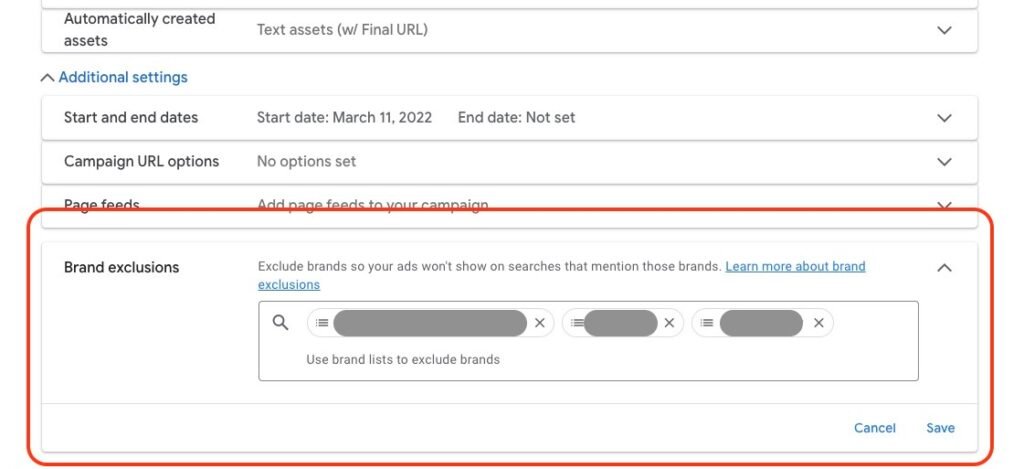
Add brand exclusions on day one. Go to Campaign settings, then Brand exclusions, and add your brand name and any common misspellings. This is separate from negative keywords and is available directly in the interface.
Negative Keywords
Campaign-level negative keywords for PMax specifically still require working through your Google Ads account representative as of April 2026. However, account-level negative keyword lists do apply to all campaigns including PMax. Build a solid account-level negative keyword list and apply it immediately.
Use the search term insights report inside PMax (found under Insights and Reports) to identify wasted spend within the first two weeks. This is where you will find irrelevant queries PMax is showing on and can add them as negatives at the account level.
| STEP 8 | Review, Publish, and Manage the Learning Phase |
Before you hit publish, run through this checklist:
- Conversion tracking is verified and firing correctly
- GA4 is linked to Google Ads
- Campaign objective is single and clear
- Bidding is set to Maximize Conversions or Maximize Conversion Value (no target set yet)
- Location is set to presence only, not interest
- Budget is at least 3x your target CPA
- Asset group has at least 8 short headlines, 4 long headlines, 5 descriptions
- All three image ratios uploaded (landscape, square, portrait)
- At least one YouTube video uploaded
- Audience signals added (customer list, website visitors minimum)
- Search themes added (15 to 20 minimum per group)
- Brand exclusions added
- Account-level negative keyword list applied
Managing the Learning Phase
Once live, the learning phase typically lasts 2 to 6 weeks. During this time, the algorithm is testing, gathering data, and finding which combinations of assets, audiences, and placements drive your conversions.
The hardest part of this phase is leaving it alone. Resist changing budgets, swapping creatives, or adjusting settings in the first two weeks. Every meaningful change you make can reset the learning phase and you start the clock again. Watch the data but do not act on early signals.
After 2 to 4 weeks with 30 to 50 conversions collected, you can start making targeted improvements: replacing low-rated assets, refining audience signals, and adding a conservative ROAS or CPA target.
What to Do After the Learning Phase Ends
Review Asset Performance Ratings
Google rates each asset as Low, Good, or Best based on its contribution to conversions within the asset group. After 4 to 6 weeks, replace assets rated Low with new creative. Never replace all your assets at once. Swap one or two at a time so the algorithm can compare old and new performance without destabilizing the group.
Check Channel Performance Breakdown
Inside your PMax campaign, go to Insights and Reports, then Channel Performance. This shows you how budget is distributing across Search, Shopping, YouTube, Display, Gmail, and Discover. If one channel is spending most of the budget but generating poor results, it is a signal to investigate placements and potentially add exclusions.
Scale Budget Gradually
Once performance has stabilized, increase budget by no more than 20 to 30 percent at a time. Wait at least one week between increases. If you are adding a Target ROAS after the learning phase, start about 20 percent below your actual goal and tighten over the following two weeks.
The 5 Biggest Performance Max Mistakes in 2026
| Mistake | What to Do Instead |
| Setting Target ROAS on day one | Run without targets for 2 to 4 weeks. Let the algorithm learn first. Add targets after 30 to 50 conversions. |
| Duplicating the same assets across multiple asset groups | Each asset group needs genuinely different creative. Same assets = same outcomes. |
| Not adding brand exclusions | Add brand exclusions from campaign settings on the day you launch. This prevents ROAS inflation from branded traffic. |
| Making changes in the first 2 weeks | Set up properly and leave it alone. Every major change can restart the learning phase. |
| Providing only minimum assets | More high-quality, varied creative = faster learning and better results. Upload all image ratios and a real video. |
Frequently Asked Questions About Performance Max Setup in 2026
What is a Performance Max campaign in Google Ads?
Performance Max is Google’s AI-driven campaign type that serves ads across all Google channels — Search, Shopping, YouTube, Display, Gmail, Discover, and Maps — from a single campaign. You provide assets, audience signals, and a conversion goal, and Google’s machine learning handles bidding, targeting, and placement automatically.
How much budget do I need to start a Performance Max campaign in 2026?
A practical rule of thumb is to set a daily budget at least 3 times your target CPA. For most businesses, this means at least $30 to $50 per day as a minimum. Campaigns need 20 to 50 conversions per month to exit the learning phase and optimize properly.
What bidding strategy should I use for Performance Max in 2026?
Start with Maximize Conversion Value (for ecommerce) or Maximize Conversions (for lead gen) without setting a Target ROAS or CPA. Let the campaign run for 2 to 4 weeks and gather 30 to 50 conversions before adding a ROAS or CPA target. Setting targets too early restricts the learning phase.
How many asset groups should I create in Performance Max?
Create one asset group per product category, service line, or audience theme. Two to four asset groups per campaign is a good starting range. Each group should have a distinct creative direction and its own set of headlines, images, and landing page. Do not duplicate assets across groups.
Does Performance Max replace Search campaigns?
No. Keep your branded search and high-intent keyword campaigns running separately. PMax handles broader reach across channels while Search gives you keyword-level control for your most valuable queries.
How long does the Performance Max learning phase last?
The learning phase typically lasts 2 to 6 weeks depending on how quickly your campaign accumulates conversions. Most accounts need 20 to 50 conversions per month for the algorithm to optimize effectively. Avoid making major changes during this period.
Can I add negative keywords to Performance Max?
You can add account-level negative keyword lists that apply to PMax campaigns. Campaign-level negative keywords for PMax specifically require working through your Google Ads representative. The brand exclusion feature is available directly in campaign settings and is the most critical exclusion to set up from day one.
Final Thoughts: Performance Max Is Not Magic. It Is a System.
After setting up hundreds of PMax campaigns, here is the simplest way I can explain what separates the ones that work from the ones that do not: the winning ones are built on accurate data, strong creative, and patience. The losing ones are built on hope and shortcuts.
Performance Max amplifies whatever you feed it. Great inputs produce great results. Weak inputs produce wasted budget. The algorithm is sophisticated, but it does not fix your broken tracking, it cannot write compelling headlines for you, and it will not stop spending on irrelevant queries if you have not set up negatives.
Follow this guide step by step. Do the boring foundation work first. Then give it time. If you do that, PMax is genuinely one of the most powerful tools Google has ever built for driving conversions at scale.
If you want us to audit your current Performance Max setup and tell you exactly where the leaks are, that is one of the things we do best at Growth Mentor Media. We work with ecommerce brands and lead gen businesses that want real results, not just impressive-looking dashboards.
Read next: Meta Ads Campaign Structure 2026: Should You Use Broad Targeting or Advantage+ Audience?
Related: Google Ads vs Meta Ads in 2026: Which Platform Gives Better ROAS for Ecommerce?
| About the Author: Sarib Khan Kakerzai is the co-founder of Growth Mentor Media, a performance marketing agency helping ecommerce and D2C brands scale with Google Ads, Meta Ads, and AI-driven growth strategies. With 7+ years running paid media for clients across the US, UK, UAE, and Pakistan, Sarib has managed PMax, Search, and Shopping campaigns across multiple verticals. Growth Mentor Media is based in Kuala Lumpur, Malaysia. |
